

Niantic has quietly rolled out two long-awaited quality-of-life updates for Weekly Challenges in Pokémon GO. You can now invite up to 10 friends to your challenge party and even get matched automatically with random Trainers if your friends aren’t available.
Both updates appear to be server-side, so they may not yet be visible to all players.
If you don’t see the new options, keep checking over the next few days — the rollout is ongoing and should reach everyone soon.
✅ TL;DR
- You can now invite up to 10 friends (group size still 4).
- You can join a random group of up to 3 Trainers via the “Join Group” button.
- Random teammates can later send Friend Requests (optional).
- Features are rolling out gradually and may not yet be live for everyone
Invite Up to 10 Friends from your Friends List
Previously, you could only send up to three invites when starting a Weekly Challenge, meaning you had to wait and hope your friends noticed before your group filled up. Now, Trainers can invite up to ten friends, although the team size remains capped at four players.
This means you can invite from a bigger pool and fill your challenge much more quickly. As one player on Reddit put it, “It used to suck forming a group, inviting 3 people, and only one joins.”
The change is already live worldwide, and many players report it makes a big difference in how fast groups form.
Random Matchmaking for Weekly Challenges
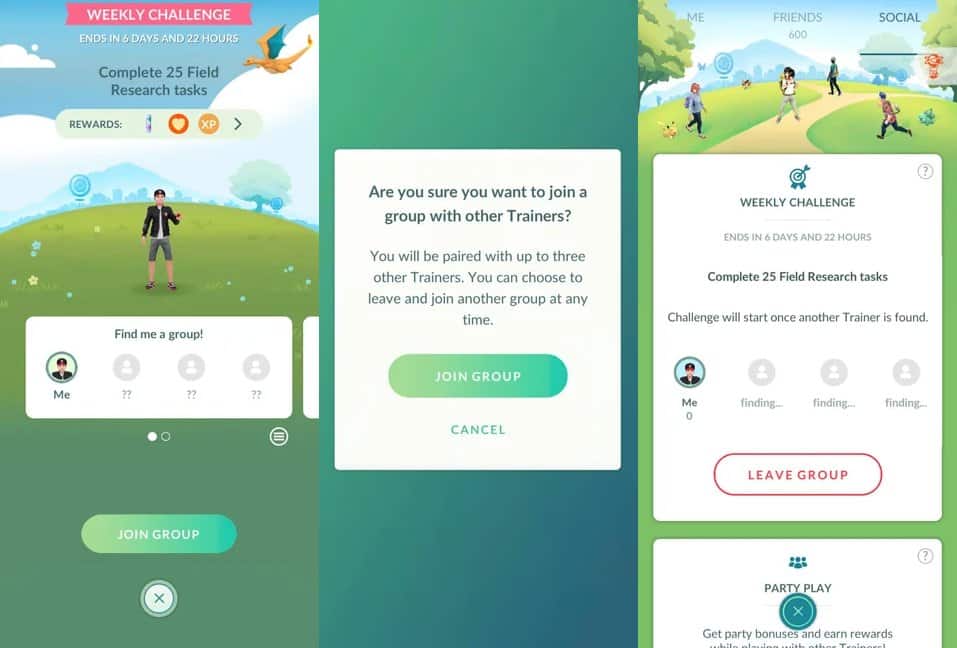
A second feature is also rolling out gradually: the ability to join a Weekly Challenge with up to three randomly selected Trainers, even if they’re not on your friends list. While not all accounts have access yet, those who do say it’s working well and helps avoid the long waits when friends don’t respond to invites.
To access it, simply:
- Swipe right on the “Invite friends!” box in the Weekly Challenge screen.
- Tap Join Group to enter matchmaking.
- You’ll be taken to the Social tab to track your matchmaking progress and see your team forming in real time.
If you’re matched into a group with fewer than four players, you can still invite your friends to fill the remaining slots, just tap the Invite Friends button at the bottom of the Progress page.
This system works similarly to Pikmin Bloom’s group finder, and it’s a great tool for helping solo players and smaller communities join challenges without waiting on friends.
Friend Requests and Privacy Options
Random matchmaking also brings new social interactions:
- You can send or receive Friend Requests from other group members by tapping their Trainer avatar or accepting the prompt at the end of a Weekly Challenge.
- If you prefer privacy, you can opt out of these requests by turning off “Allow Friend Requests in Weekly Challenges” in your General Settings.
This gives Trainers more control over how social they want their challenge experience to be.